
AI Translation
Jamdesk translates your docs into the languages you pick after every build and commits the pages to your GitHub repository.
Jamdesk can translate your documentation for you. Pick the languages in project settings. Jamdesk translates your English pages after every build. It commits the results to your GitHub repository in language-prefixed directories. The translations are yours. They sit in your repo and your Git history. Edit them like any other file.
For per-locale navigation and the language switcher, see Multi-Language Support. That configuration applies whether the translations come from Jamdesk, your own translators, or another tool.
Prerequisites
- A connected GitHub repository for the project. Translated pages are committed back to your repo. A project deployed from the CLI or a tarball can't use this.
- Write access for the Jamdesk GitHub App to make that commit. The Translations panel flags missing access and links a GitHub admin to grant it. It's a one-time step per GitHub account.
Every plan includes automatic translation, including trials. There's no per-word pricing and no credits to buy.
Turn it on
Go to your project in the Jamdesk dashboard, open Settings, and scroll to Translations.
Switch on Translate my documentation and tick the languages you want. Each one is listed by its native name with the English name beside it.
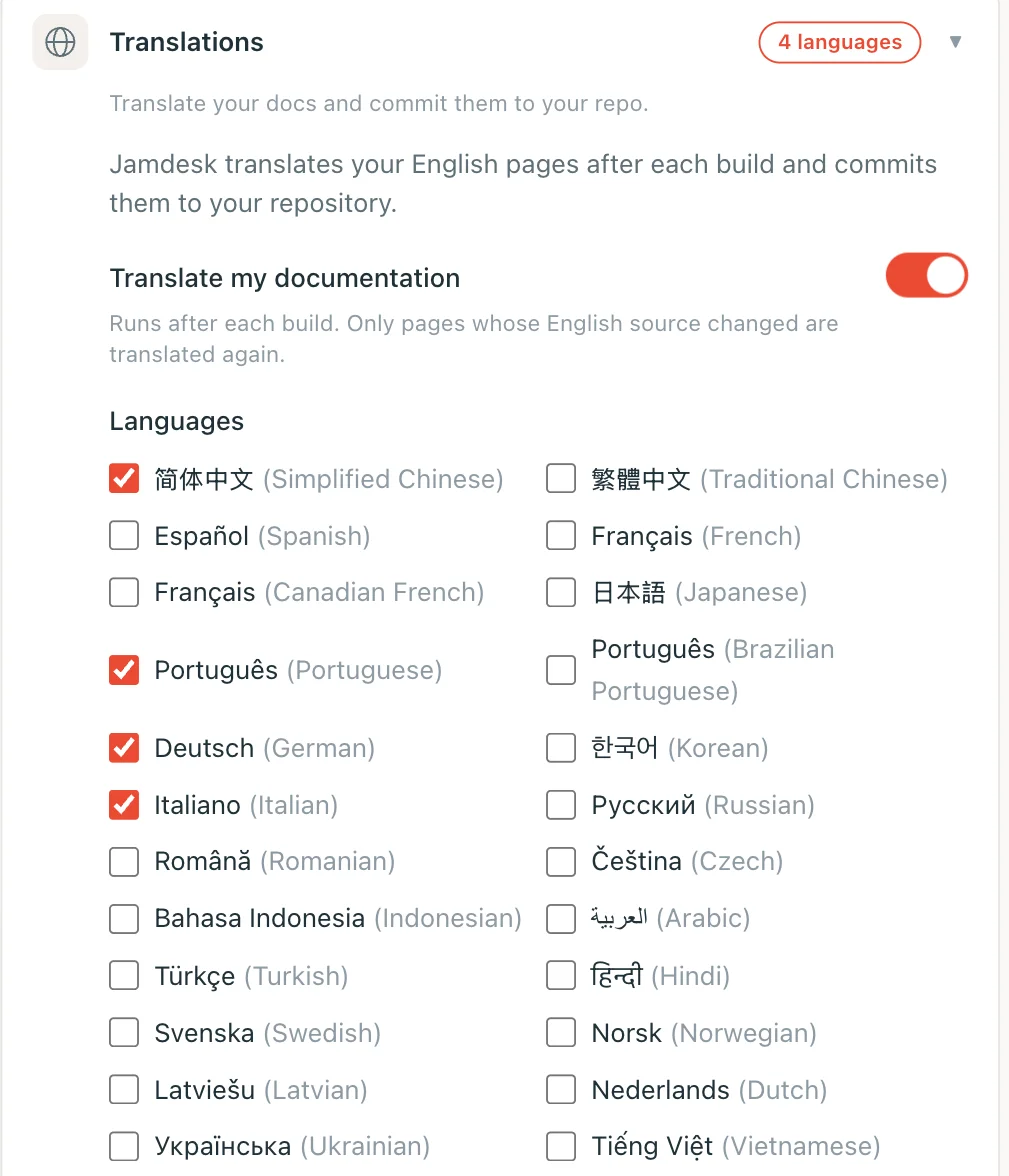
Translation runs after a build finishes. The first run translates every page and commits the files to your repository. Review them like any other commit.
Limits
Limits are per project:
| Limit | Value |
|---|---|
| Languages per project | Up to 5 |
| Pages translated per month | 10,000 |
Only what changed
The first run translates everything. Later runs retranslate only pages whose English source changed. Fixing a typo on one page costs one page, not your whole site. A stable site uses a small fraction of the monthly allowance.
Translations Jamdesk leaves alone
Jamdesk treats two kinds of translation as written by you. It never replaces them on its own:
- Translations you already had. Jamdesk adopts translated pages already in your repository when you switch the feature on. It does not overwrite them. Work you wrote yourself, or paid a vendor for, stays as it is.
- Translations you edit. Jamdesk detects a translated page you change by hand. Your wording survives every later run.
These pages are on a permanent hold. They are never translated again automatically, even after their English source changes. They appear in the Translations panel under Edited by hand when their English source changes.
Every page listed there has a Replace with AI translation button. It hands that page back to the AI. Your version is discarded. The page is translated again on your next build, not the moment you click. That button is the only way to lift the hold.
"Only what changed" doesn't cover these pages. A page Jamdesk translated refreshes when its English source changes. A page you wrote or edited waits for you to ask.
Links between translated pages
Translated headings get their own anchors, so /de/setup/languages#… uses the German heading. Jamdesk keeps those anchors steady:
- A retranslated page keeps the wording of the headings you didn't touch. Add or rename one English heading and only that heading is translated fresh. Links from other pages to the rest of the page keep landing where they did.
- Pages you wrote or edited get their broken anchors fixed. If one of these pages links to a heading whose anchor changed, Jamdesk updates the part of the link after the
#. Nothing else on your page changes.
Turning a language off
Untick a language to stop translating into it. Nothing is deleted. Pages already committed stay in your repository unchanged.