
Frequently Asked Questions
Common questions about Jamdesk: pricing, build times, custom domains, team collaboration, AI chat, GitHub integration, and documentation site features.
Common questions about pricing, builds, domains, and features.
Getting Started
Jamdesk is a documentation platform that builds docs sites from your Markdown files. Write in MDX, push to GitHub, and your site deploys automatically with search, analytics, and AI-ready llms.txt.
No coding required. Writing in MDX is like using a text editor: you write plain text with simple formatting. Components are available if you want them, but they're entirely optional.
Yes! We offer a 14-day free trial with full access to all features.
Jamdesk is built around MDX and GitHub: your docs are plain text files in a repo, not locked in a proprietary editor. Push to GitHub and your site deploys in under 60 seconds with no build configuration or CI/CD pipeline. Every site gets llms.txt and an MCP server automatically, so AI tools like Claude and ChatGPT can access your current docs directly. Visitors get a built-in AI chat assistant that answers questions from your docs, too.
Builds & Deployment
Most documentation sites build in 30-60 seconds. Larger sites with many pages may take longer.
Yes! Use the Jamdesk CLI (jamdesk dev) to preview locally with hot reload. Changes only go live when you push to GitHub or run jamdesk deploy.
Yes. Run jamdesk deploy from your project directory. The CLI packages your files, uploads them, and triggers a build directly. No Git repo required. See the CLI Deploy guide for details.
Builds trigger automatically when you push to your connected GitHub branch. You can also trigger builds manually from the dashboard or with jamdesk deploy from the CLI.
Yes. Go to Deployments in your project, find the previous build, and click Rollback.
Billing & Pricing
The Pro plan is $29/month per project. Additional projects are $15/month each. See Plans & Pricing for details.
We offer a 14-day free trial. After that, you'll need a Pro subscription to continue.
We accept Visa, Mastercard, American Express, and Discover credit cards.
We offer refunds within 30 days of your first payment. Contact support for assistance.
Custom Domains
Yes! Add a custom domain in Settings → Domains. SSL certificates are provisioned automatically.
DNS changes typically propagate within a few hours, but can take up to 48 hours.
Yes. Use a reverse proxy (Cloudflare, AWS, nginx) to serve Jamdesk at a subpath. See Subpath Hosting.
Teams & Collaboration
Open your project, go to Settings → Members, type the person's email in the Invite Member field, and click Invite. They'll get an email with a link to join the project.
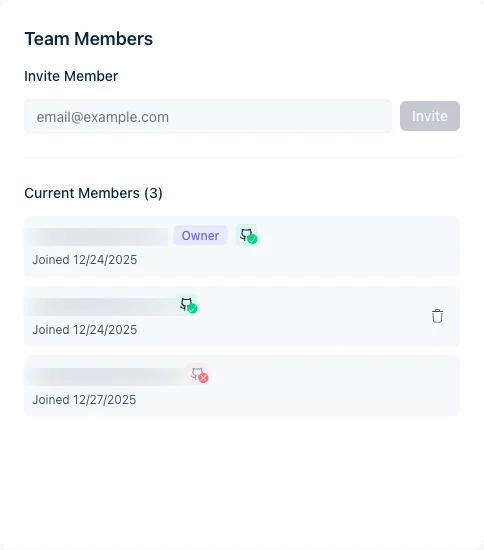
Invited users need a Jamdesk account; if they don't have one, they're prompted to create it when accepting. Already a member, but the invite link says it's "already been accepted"? You don't need a new invitation. Just sign in and you'll land back in the project. See Team Members for roles and member limits.
Every plan includes unlimited team members per project, at no extra charge.
Team members can view builds and trigger rebuilds, but editing happens in your GitHub repository. Anyone with repository access can edit the docs.
Go to Settings → Members, then click Transfer Ownership next to the member you want to promote. The new owner must be an existing team member.
CLI
In ~/.jamdeskrc, a JSON file with 0600 permissions (only your user can read it). It stores your refresh token, email, and user ID. Run jamdesk logout to clear it.
Your refresh token is no longer valid. This happens after password changes, account deletions, or extended inactivity. Run jamdesk login to get a fresh session.
Yes, but the browser-based login won't work in headless environments. Log in on your local machine, then copy ~/.jamdeskrc to your CI runner. The refresh token handles authentication from there.
Run jamdesk fix. It repairs broken internal links that have an unambiguous correct target (typo'd anchors and cross-locale anchor drift), editing your local .mdx files after a preview. Use jamdesk fix --dry-run to see the planned changes first; only links whose corrected anchor is a real heading are touched, leaving ambiguous cases for manual review. See Auto-fix broken links.
Content & Features
Jamdesk supports MDX (Markdown + JSX) and standard Markdown files.
Yes. Define inline components directly in MDX with export const, or create reusable components in the /snippets directory. For interactive components with hooks, use .tsx files with 'use client'. See Custom React Components and Snippets.
No hard limit on pages. Most documentation sites work well with hundreds of pages.
Yes. Use the languages property in your navigation config to create a language switcher. Each language gets its own navigation structure and content. See Multi-Language Support.
No. Jamdesk does not translate content for you. You provide the translated MDX files and Jamdesk handles routing, navigation, the language switcher, and RTL styling. Bring translations from your own workflow (human translators, machine translation, or an LLM) and place them in language-prefixed directories (es/, fr/, etc.). See Multi-Language Support for the directory layout and config.
AI Chat
Yes. Every Jamdesk site includes a built-in chat assistant that answers visitor questions from your documentation. It's enabled by default, no setup required. See AI Chat for details.
No. AI chat is included on all plans at no additional cost.
Yes. Set chat.enabled to false in your docs.json:
{ "chat": { "enabled": false } }The chat panel and keyboard shortcut will be removed after your next build.
The chat only uses your published documentation pages. During each build, Jamdesk indexes your content into a vector database. When a visitor asks a question, relevant sections are retrieved and sent to Claude as context. The AI cannot access data outside your docs.
Privacy & Access
Yes. Mark internal pages with private: true in frontmatter, or list their paths under auth.password.private[] in docs.json. Public pages stay public; private ones show an unlock screen. Everything stays in a single project, so public and private pages share the same repo and build. See Access Control and Password Protection.
Set auth.password.enabled: true in docs.json, push the change, then set a password in Project Settings → Password Protection in the dashboard. Every visitor sees an unlock screen until they enter it. See Password Protection.
Yes, on Enterprise plans. Single Sign-On lets readers authenticate against your identity provider (Okta, Google Workspace, Azure AD, etc.) with no shared passwords, a full audit trail, and instant deprovisioning. See SSO or contact Enterprise sales.
Usually no. A single project with private: true on the internal pages is simpler because you keep everything in one repo and manage it from one dashboard. Use two projects only when the audiences need fully separate branding, custom domains, or analytics. See Access Control for the patterns.
Editors write the docs by committing MDX to your connected GitHub repo, so anyone with push access to your docs branch can publish a change. Readers view the published site: everyone (public), anyone with the password (password mode), or anyone signed in via your IdP (SSO). Dashboard team members are a separate concept: they manage builds and analytics but don't author content directly. See Access Control.